
How to uninstall Script Logic application using SCCM
Hi,
Anyone here can help me to create a command line to uninstall this 2 Script Logic application using SCCM. I've tried to use this command line msiexec /x "USBPort Security.exe" on my computer to test either this command right or not before I start to using on SCCM, but this error will occurred when the time I want to uninstall it " This installation package could not be opened. Verify that the package exists and that you can access it, or contact the application vendor to verify that this is a valid Windows Installer package". Please help me to fixed this problem.
Thanks
Don
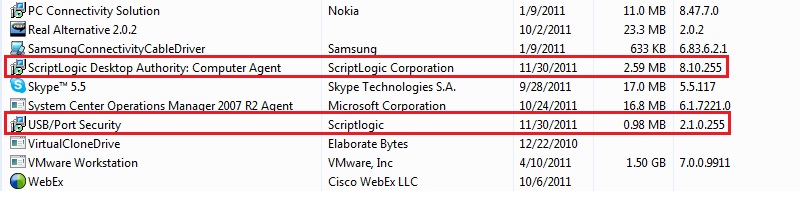
Anyone here can help me to create a command line to uninstall this 2 Script Logic application using SCCM. I've tried to use this command line msiexec /x "USBPort Security.exe" on my computer to test either this command right or not before I start to using on SCCM, but this error will occurred when the time I want to uninstall it " This installation package could not be opened. Verify that the package exists and that you can access it, or contact the application vendor to verify that this is a valid Windows Installer package". Please help me to fixed this problem.
Thanks
Don
0 Comments
[ + ] Show comments
Answers (3)
Please log in to answer
Posted by:
anonymous_9363
12 years ago


MSIExec is used to uninstall MSI-driven installs, not executable-driven ones.
Find the 'UninstallString' for the products in the registry (HKLM\Software\Microsoft\Windows\CurrentVersion\Uninstall\[GUID or ProductName]) and use that in your command line.
Find the 'UninstallString' for the products in the registry (HKLM\Software\Microsoft\Windows\CurrentVersion\Uninstall\[GUID or ProductName]) and use that in your command line.
Posted by:
pjgeutjens
12 years ago

For some reason the icon on those apps makes me suspect the exe to be a wrapper around an msi...
Finding an MSIEXEC /X<Guid> in the uninstall command regkey Ian mentioned would prove me right.
Finding an MSIEXEC /X<Guid> in the uninstall command regkey Ian mentioned would prove me right.
Posted by:
anonymous_9363
12 years ago
the icon on those apps makes me suspect the exe to be a wrapper around an msi.I somehow doubt whether AppWiz.CPL is intelligent enough to drill through an EXE and determine that there's an MSI lurking within. I think that that's a generic icon in SHELL32.DLL (or 64-bit equivalent). It crops up all over the place.
 Rating comments in this legacy AppDeploy message board thread won't reorder them,
so that the conversation will remain readable.
